Connecting User Defined Networks
Introduction
ClusterNetworkConnect (CNC) enables cluster administrators to connect multiple isolated UserDefinedNetworks (UDNs) and/or ClusterUserDefinedNetworks (CUDNs) together. By default, workloads on different (C)UDNs are completely isolated from each other. CNC provides a declarative way to establish connectivity between these isolated network islands — either full pod-to-pod communication, service-only access, or both — while preserving isolation for networks that are not explicitly connected.
Motivation
As clusters adopt User Defined Networks for tenant and workload isolation, there are many real-world scenarios where controlled connectivity between these isolated networks becomes necessary:
- Network expansion: A (C)UDN's address space is exhausted and CIDR expansion is not supported (Layer2 networks) or only allows adding new nodes (Layer3 networks), but not per-node subnet expansion. The admin creates a new UDN and connects it to the original so workloads can communicate across both.
- Inter-tenant service access: Two teams operate on separate UDNs but one team needs to consume the other's microservice via ClusterIP without direct pod access.
- Temporary or permanent tenant merging: Two previously isolated tenants need unrestricted communication for a joint project, with the ability to disconnect later.
- Mixed topology connectivity: A Layer3 tenant network needs to communicate with a Layer2 gateway network that provides HA via OVN virtual ports.
- Platform migration: Workloads migrated from other platforms (e.g. NSX) that had inter-segment routing need the same architecture replicated with connected UDNs.
See the enhancement proposal for the full set of user stories and detailed design.
How to enable this feature on an OVN-Kubernetes cluster?
This feature requires the following flags to be enabled:
--enable-network-segmentation(required for UDNs)--enable-multi-network(required for UDNs)--enable-network-connect(enables ClusterNetworkConnect)
When using Helm, set global.enableNetworkConnect: true in your values file.
Workflow Description
The overall workflow is:
- Create your UDNs/CUDNs — set up isolated networks for your tenants as usual.
- Create a ClusterNetworkConnect — select which networks to connect and what level of connectivity is desired.
- OVN-Kubernetes reconciles — the controller creates a transit
connect-routerand wires it to the selected networks' routers, establishing the requested connectivity.
Connectivity is symmetric: if UDN-A is connected to UDN-B, then UDN-B is connected to UDN-A.
Connectivity is non-transitive: if UDN-A and UDN-B are connected, and UDN-B and UDN-C are connected, UDN-A is not automatically connected to UDN-C. Each connection must be explicitly declared.
High-Level Topology
When a ClusterNetworkConnect CR is created, OVN-Kubernetes creates a new
distributed connect-router and peers it with the routers of all selected
networks:
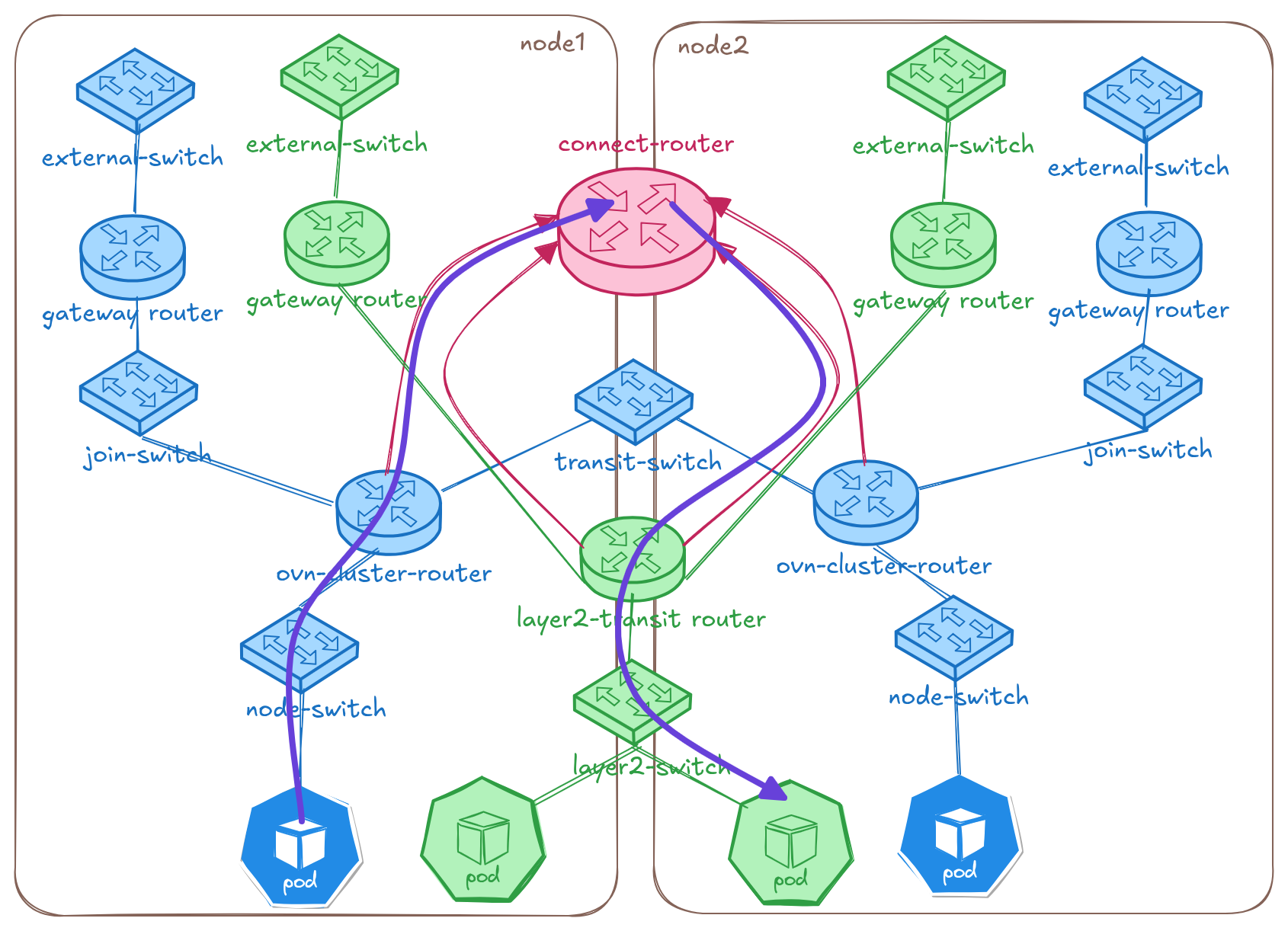
The diagram shows two isolated networks — blue-network (blue, Layer3) and green-network (green, Layer2) — each with their own routers and switches across two nodes. When a ClusterNetworkConnect is created, OVN-Kubernetes provisions a connect-router (pink, top center) and peers it with both networks' routers. The purple line traces the path of a cross-network packet: from a blue pod on node1, up through the blue cluster router, across the connect-router, and down through the green transit router to reach a green pod on node2.
Examples
Prerequisites
For all examples below, we assume you have an OVN-Kubernetes cluster with the feature flags enabled.
Example 1: Full Pod and Service Connectivity Between Two CUDNs
Suppose you have two CUDNs named blue-network and green-network
and you want full connectivity (pods can talk to pods, and services
are accessible across both networks).
Step 1: Create the namespaces
Namespaces that will use a primary UDN must be labeled with
k8s.ovn.org/primary-user-defined-network at creation time:
apiVersion: v1
kind: Namespace
metadata:
  name: blue
  labels:
    network: blue
    k8s.ovn.org/primary-user-defined-network: ""
---
apiVersion: v1
kind: Namespace
metadata:
  name: green
  labels:
    network: green
    k8s.ovn.org/primary-user-defined-network: ""
Step 2: Create the CUDNs
Labels on CUDNs propagate to the underlying NADs, so add labels that
the CNC networkSelector can match on:
apiVersion: k8s.ovn.org/v1
kind: ClusterUserDefinedNetwork
metadata:
  name: blue-network
  labels:
    app: colored-enterprise
spec:
  namespaceSelector:
    matchLabels:
      network: blue
  network:
    topology: Layer3
    layer3:
      role: Primary
      subnets:
      - cidr: 103.103.0.0/16
        hostSubnet: 24
---
apiVersion: k8s.ovn.org/v1
kind: ClusterUserDefinedNetwork
metadata:
  name: green-network
  labels:
    app: colored-enterprise
spec:
  namespaceSelector:
    matchLabels:
      network: green
  network:
    topology: Layer3
    layer3:
      role: Primary
      subnets:
      - cidr: 104.104.0.0/16
        hostSubnet: 24
Step 3: Create the ClusterNetworkConnect
The networkSelector matches against labels on the NADs (which inherit
labels from their parent CUDN):
apiVersion: k8s.ovn.org/v1
kind: ClusterNetworkConnect
metadata:
  name: blue-green-connect
spec:
  networkSelectors:
    - networkSelectionType: ClusterUserDefinedNetworks
      clusterUserDefinedNetworkSelector:
        networkSelector:
          matchLabels:
            app: colored-enterprise
  connectSubnets:
  - cidr: "192.168.0.0/16"
    networkPrefix: 24
  connectivity:
    - PodNetwork
    - ServiceNetwork
Step 4: Verify the status
$ kubectl get cnc blue-green-connect
NAME                 AGE   STATUS
blue-green-connect   5s
Check the detailed conditions:
$ kubectl describe cnc blue-green-connect
Name:         blue-green-connect
Namespace:
Labels:       <none>
Annotations:  k8s.ovn.org/connect-router-tunnel-key: 16715782
              k8s.ovn.org/network-connect-subnet: {"layer3_1":{"ipv4":"192.168.0.0/24"},"layer3_2":{"ipv4":"192.168.1.0/24"}}
API Version:  k8s.ovn.org/v1
Kind:         ClusterNetworkConnect
Spec:
  Connect Subnets:
    Cidr:            192.168.0.0/16
    Network Prefix:  24
  Connectivity:
    PodNetwork
    ServiceNetwork
  Network Selectors:
    Cluster User Defined Network Selector:
      Network Selector:
        Match Labels:
          App:               colored-enterprise
    Network Selection Type:  ClusterUserDefinedNetworks
Status:
  Conditions:
    Last Transition Time:  2026-04-29T18:48:32Z
    Message:               All validation checks passed successfully
    Reason:                ResourceAllocationSucceeded
    Status:                True
    Type:                  Accepted
Events:                    <none>
The Accepted condition being True with reason ResourceAllocationSucceeded
means the cluster manager validated the CNC and allocated subnets for the
connected networks. The annotations show the tunnel key and the per-network
subnet allocations.
Step 5: Deploy test workloads
Create pods and services on both networks:
$ kubectl run blue-pod -n blue --image=registry.k8s.io/e2e-test-images/agnhost:2.43 \
    --labels="app=blue" --command -- /agnhost netexec --http-port=8080
$ kubectl run green-pod -n green --image=registry.k8s.io/e2e-test-images/agnhost:2.43 \
    --labels="app=green" --command -- /agnhost netexec --http-port=8080
$ kubectl wait --for=condition=ready pod/blue-pod -n blue --timeout=60s
$ kubectl wait --for=condition=ready pod/green-pod -n green --timeout=60s
Expose them as ClusterIP services:
$ kubectl expose pod blue-pod -n blue --name=service-blue --port=80 --target-port=8080
$ kubectl expose pod green-pod -n green --name=service-green --port=80 --target-port=8080
Step 6: Test connectivity
Pods on the blue network can now directly reach pods on the green network and vice versa. Services created in either namespace are also accessible from the other network:
$ kubectl exec -n blue blue-pod -- curl -s http://service-green.green.svc.cluster.local/hostname
green-pod

$ kubectl exec -n green green-pod -- curl -s http://service-blue.blue.svc.cluster.local/hostname
blue-pod
Example 2: Service-Only Connectivity (No Direct Pod Access)
When you want two tenants to communicate only through ClusterIP services
without allowing direct pod-to-pod traffic, omit PodNetwork from the
connectivity list:
apiVersion: k8s.ovn.org/v1
kind: ClusterNetworkConnect
metadata:
  name: frontend-backend-services
spec:
  networkSelectors:
    - networkSelectionType: ClusterUserDefinedNetworks
      clusterUserDefinedNetworkSelector:
        networkSelector:
          matchLabels:
            tier: application
  connectSubnets:
  - cidr: "10.200.0.0/16"
    networkPrefix: 24
  connectivity:
    - ServiceNetwork
With this configuration:
- Pods in "frontend" network can access ClusterIP services in "backend" network and vice versa
- Pods in "frontend" network cannot directly reach pod IPs in "backend" network
Example 3: Connecting UDNs Across Namespaces
You can also select primary UDNs by namespace instead of (or in addition to) CUDNs:
apiVersion: k8s.ovn.org/v1
kind: ClusterNetworkConnect
metadata:
  name: colored-enterprise
spec:
  networkSelectors:
    - networkSelectionType: ClusterUserDefinedNetworks
      clusterUserDefinedNetworkSelector:
        networkSelector:
          matchLabels:
            app: colored-enterprise
    - networkSelectionType: PrimaryUserDefinedNetworks
      primaryUserDefinedNetworkSelector:
        namespaceSelector:
          matchExpressions:
          - key: kubernetes.io/metadata.name
            operator: In
            values:
            - yellow
            - red
  connectSubnets:
  - cidr: "192.168.0.0/16"
    networkPrefix: 24
  - cidr: "fd01::/112"
    networkPrefix: 120
  connectivity:
    - PodNetwork
    - ServiceNetwork
This connects CUDNs labeled app: colored-enterprise together with
the primary UDNs serving the yellow and red namespaces. The
PrimaryUserDefinedNetworks selector uses kubernetes.io/metadata.name
which is a built-in label on namespaces. Dual-stack connectSubnets are
provided for clusters running dual-stack networking.
Example 4: Disconnecting Networks
To disconnect networks, simply delete the ClusterNetworkConnect resource:
$ kubectl delete cnc blue-green-connect
clusternetworkconnect.k8s.ovn.org "blue-green-connect" deleted
The controller will tear down the connect router and remove all routing policies, restoring full isolation between the networks.
You can also disconnect a specific network by updating the
networkSelectors to no longer match it (e.g. change labels on the
network or update the selector expression).
User Facing API
The ClusterNetworkConnect CRD is a cluster-scoped, admin-only
resource in the k8s.ovn.org/v1 API group.
Short name: cnc
See the API Reference for the full specification.
Key Fields
| Field | Description |
|---|---|
spec.networkSelectors |
Selects which networks to connect. Supports ClusterUserDefinedNetworks (by CUDN label) and PrimaryUserDefinedNetworks (by namespace label). |
spec.connectSubnets |
The CIDR range(s) used internally to wire the networks together. At most 1 per IP family. Must not overlap with pod, service, transit, join, masquerade, or node subnets. Immutable once set. |
spec.connectSubnets[].networkPrefix |
The prefix length carved out per connected Layer3 network. Determines max nodes per network. |
spec.connectivity |
What kind of connectivity to enable: PodNetwork (direct pod-to-pod), ServiceNetwork (ClusterIP access), or both. |
Connectivity Types
| Type | What it enables |
|---|---|
PodNetwork |
Full pod-to-pod communication across connected networks. |
ServiceNetwork |
ClusterIP services are accessible across connected networks, but pods cannot reach each other directly. NodePort and LoadBalancer services are already reachable across UDNs by default. |
| Both | Full pod + service connectivity. |
Sizing connectSubnets
The connectSubnets CIDR and networkPrefix control how many networks
and nodes can participate in a connection. Planning these values carefully
is important.
For Layer3 networks, each connected network gets a /networkPrefix
slice from the CIDR. Within that slice, each node gets a /31 (IPv4) or
/127 (IPv6) point-to-point subnet. So the networkPrefix must have
enough IPs for your nodes.
For Layer2 networks, each connected network only needs a single /31
or /127 (no per-node allocation needed).
Recommended networkPrefix values based on cluster size:
| Max Nodes | Recommended networkPrefix |
IPs per Network |
|---|---|---|
| 10 | /26 | ~40 |
| 100 | /23 | ~400 |
| 1000 | /20 | ~4000 |
| 5000 | /17 | ~20000 |
Dual-stack requirement: When providing both an IPv4 and IPv6
connectSubnets, the networkPrefix values must have matching host
bits. That is, (32 - ipv4NetworkPrefix) must equal
(128 - ipv6NetworkPrefix). For example, an IPv4 networkPrefix: 24
(8 host bits) requires an IPv6 networkPrefix: 120 (also 8 host bits).
Max CIDR size: /16 (65536 IPs). OVN has a limit of 32K tunnel keys
per router, so larger CIDRs won't be fully utilized.
Max connectable networks = CIDR size / networkPrefix size. For
example, 192.168.0.0/16 with networkPrefix: 24 gives 256 possible
network slots.
Status and Conditions
The CNC status reports whether the configuration was accepted and resources were allocated successfully by the cluster manager:
| Condition Type | Reason | Meaning |
|---|---|---|
Accepted |
ResourceAllocationSucceeded |
Validation passed, subnets allocated for all selected networks |
Accepted |
ResourceAllocationFailed |
Validation or allocation failed — the condition message explains the error |
Troubleshooting
Check the CNC status
$ kubectl get cnc
NAME                 AGE   STATUS
blue-green-connect   10m
Describe the resource to see the Accepted condition:
$ kubectl describe cnc blue-green-connect
If the Accepted condition has Status: False and reason
ResourceAllocationFailed, the Message field describes
what went wrong. Common error messages include:
| Error message pattern | Cause | Fix |
|---|---|---|
| "overlap with cluster network connect subnets" | connectSubnets overlaps with pod subnets, service CIDR, transit/join/masquerade subnets |
Choose a non-overlapping CIDR for connectSubnets |
| "connectSubnets overlap detected between CNC ... and CNC ..." | Another CNC selecting the same network uses an overlapping connectSubnets |
Each CNC selecting the same network must use distinct connectSubnets |
| "selected networks have overlapping subnets" | The selected networks have overlapping pod subnets | Connecting networks with overlapping pod subnets is not supported |
| "IP family conflict" | Trying to connect an IPv4-only network with an IPv6-only network, or connectSubnets missing the required IP family |
Networks must use the same IP family; provide matching connectSubnets |
| "transport type ... not supported for networkConnect" | Selected network uses no-overlay or EVPN transport | Only overlay-based networks are supported |
| "failed to allocate ... subnet for network" | Not enough IPs in connectSubnets for all network-node combinations |
Use a larger CIDR or a smaller networkPrefix value |
Inspect the connect router
You can inspect the OVN topology created by the CNC using ovn-nbctl
from inside an ovnkube-node pod:
$ ovn-nbctl show connect_router_blue-green-connect
router ff42d0fb-7519-4ed5-ab0a-9ae2b9100b6e (connect_router_blue-green-connect)
    port crtor-blue-green-connect_cluster_udn_green-network_ovn-worker2
        mac: "0a:58:c0:a8:01:06"
        networks: ["192.168.1.6/31"]
    port crtor-blue-green-connect_cluster_udn_green-network_ovn-control-plane
        mac: "0a:58:c0:a8:01:04"
        networks: ["192.168.1.4/31"]
    port crtor-blue-green-connect_cluster_udn_green-network_ovn-worker
        mac: "0a:58:c0:a8:01:08"
        networks: ["192.168.1.8/31"]
    port crtor-blue-green-connect_cluster_udn_blue-network_ovn-control-plane
        mac: "0a:58:c0:a8:00:04"
        networks: ["192.168.0.4/31"]
    port crtor-blue-green-connect_cluster_udn_blue-network_ovn-worker2
        mac: "0a:58:c0:a8:00:06"
        networks: ["192.168.0.6/31"]
    port crtor-blue-green-connect_cluster_udn_blue-network_ovn-worker
        mac: "0a:58:c0:a8:00:08"
        networks: ["192.168.0.8/31"]
Check routes on the connect router:
$ ovn-nbctl lr-route-list connect_router_blue-green-connect
IPv4 Routes
Route Table <main>:
           103.103.0.0/24               192.168.0.5 dst-ip
           103.103.1.0/24               192.168.0.9 dst-ip
           103.103.2.0/24               192.168.0.7 dst-ip
           104.104.0.0/24               192.168.1.5 dst-ip
           104.104.1.0/24               192.168.1.9 dst-ip
           104.104.2.0/24               192.168.1.7 dst-ip
Check routing policies on a network's cluster router (the priority 9001 policies steer cross-network traffic to the connect router):
$ ovn-nbctl lr-policy-list cluster_udn_blue.network_ovn_cluster_router
Routing Policies
      9001 inport == "rtos-cluster_udn_blue.network_ovn-worker2" && ip4.dst == 104.104.0.0/16         reroute               192.168.0.6
      ...
Best Practices
- Plan your
connectSubnetsCIDR for growth. The CIDR is immutable once set, so choose a range large enough to accommodate future networks and nodes. A/16gives you maximum flexibility. - Set
networkPrefixto 4x your max planned node count. This accounts for non-contiguous node IDs and future node churn. - Use
ServiceNetworkonly when full pod connectivity is not needed. This provides a tighter security boundary — tenants can consume each other's APIs through services without exposing individual pods. - Avoid overlapping
connectSubnetsacross multiple CNCs. If the same network is selected by more than one CNC, each CNC must use a distinctconnectSubnetsrange. - Label your networks meaningfully. Using labels like
tier: frontendorteam: paymentson your CUDNs makes thenetworkSelectorin CNCs more manageable and less brittle than enumerating names.
Known Limitations
- Overlapping pod subnets: Connecting networks that have overlapping
pod subnets is not supported. The controller will report an
OverlappingNetworkSubnetserror. - Secondary networks: Only
role: Primarynetworks can be connected. Connectingrole: SecondaryUDNs/CUDNs is a future goal. - Localnet networks:
localnettype networks cannot be connected using CNC. These can be connected together using bridges. - No-overlay mode: CNC is not supported when overlay tunnel encapsulation is disabled.
connectSubnetsis immutable: Once set, it cannot be changed. Plan the value carefully before creating the CNC.- Live migration: Live migration and persistent IPs across connected UDNs is not supported.
- Non-transitive connectivity: Connections are not transitive. If A-B and B-C are connected, A-C requires its own CNC.
- Node subnet validation: The controller validates
connectSubnetsagainst pod subnets, service CIDRs, and other cluster subnets, but does not validate against physical node subnets chosen by the platform. Ensure yourconnectSubnetsdo not overlap with your node network.
Known Issues
- Network Policies do not span connected networks: Network Policy peers cannot currently be selected across connected networks. If two UDNs are connected via CNC, a NetworkPolicy in one network cannot reference pods in the other network as ingress/egress peers. Handling overlapping IPs across connected networks is also not yet supported. See #6331.
- Advertised networks are not supported in isolated mode: Connecting two BGP-advertised networks that use geneve tunnels for east-west traffic is not yet supported. See #6332.
Future Items
- Connecting
role: SecondaryUDNs and CUDNs - Tenant self-service: a namespace-scoped API for tenants to connect their own networks without admin intervention
- Connecting UDNs with overlapping pod subnets via service-based routing
- Cross-cluster UDN connectivity using EVPN
- Metrics and alerts for connected network health, traffic, and errors